
Localized copy
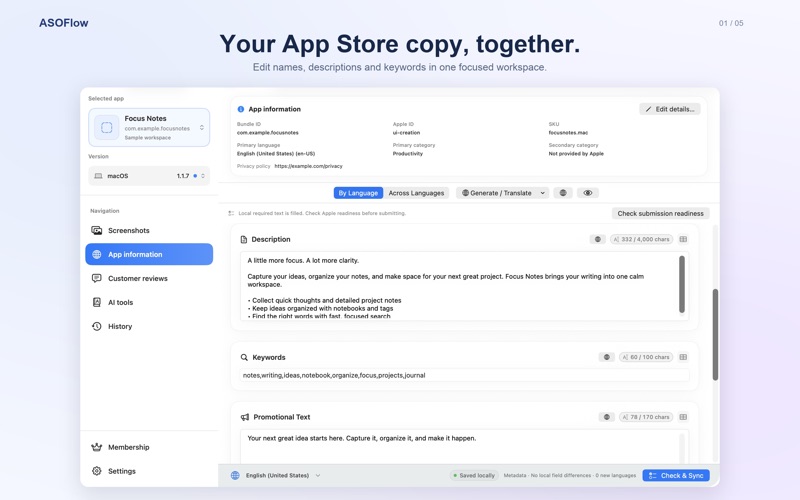
Edit names, descriptions, and keywords by locale or across locales, with field limits and diffs.
THE APP STORE CONNECT WORKSPACE FOR MAC
Manage localized store content and prepare updates on your Mac. Let AI help draft and translate, and compatible agents help you prepare. Every review and sync is your decision.
Native macOS app · Requires macOS 14 or later
MADE FOR EVERY UPDATE
Names, descriptions, keywords, languages, and release details can pull you in different directions. ASOFlow brings the work together so you can focus on the content.
AI CONTENT WORKFLOW
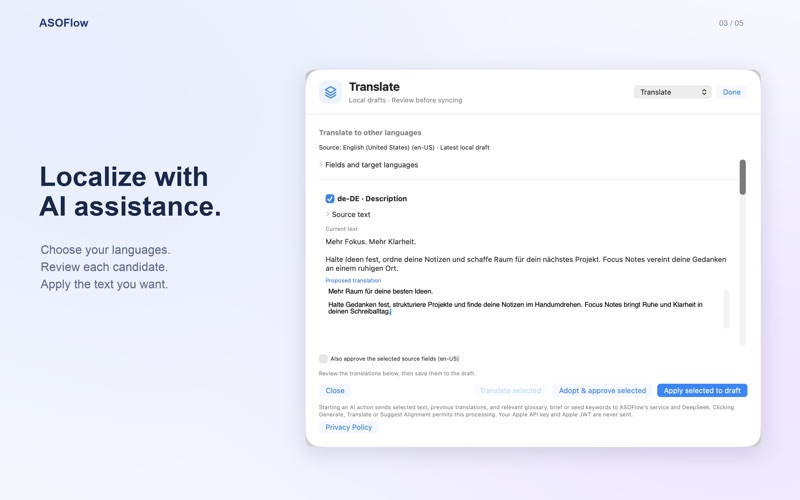
Draft store copy, translate updates, or explore subtitle and keyword suggestions. AI creates candidates for you to compare, edit, adopt, or discard.
AI features require Pro and an available service. Candidates are never approved or published automatically.
A WORKFLOW FOR AGENTS
Export agent skills from settings and use the local CLI after closing the graphical app. Connect explicitly supported commands to your workflow; compatibility and available commands depend on your client and app version.
Installing a skill or supplying parameters is not authorization. Agents do not bypass review.
ONE WORKSPACE, MANY TASKS
Bring recurring tasks together and work through them at your own pace.
Edit names, descriptions, and keywords by locale or across locales, with field limits and diffs.
Explore subtitle and keyword suggestions, then compare and edit candidates before choosing what to adopt.
Manage version screenshots, read customer reviews, and prepare replies. Remote changes require confirmation.
Check submission readiness, select an uploaded build, and confirm before submitting for review.
ASOFlow does not upload build binaries or automatically publish your app.
FROM DRAFT TO SYNC
Candidates, drafts, approval, and remote operations are separate steps, with a clear decision at each one.
Use your own App Store Connect API key, or start with a local sample.
Select an app, version, and language. Edit manually or ask AI for help.
Inspect candidates and local drafts, review differences, and approve items individually.
Refresh remote content, check for conflicts, and review the preview before confirming a sync.
PRIVACY & CONTROL
If you choose to remember your Apple private key, it is stored in the Mac Keychain; session-only keys stay in memory. App Store Connect credentials and JWTs are not sent to AI services.
For built-in AI, selected text and context are sent to ASOFlow and DeepSeek. Your own API uses the provider you choose. Agent clients may also process requested data under their own terms.
Read the privacy policyPLANS
Organize store content, manage screenshots, and confirm changes before syncing.
Use built-in AI or your own AI API to draft, translate, and prepare candidates.
See the app for current entitlements, subscription terms, and local pricing. Your AI provider bills separately when you use your own API.
FAQ
ASOFlow is a native macOS App Store Connect workspace for managing store content, localizations, and parts of release preparation.
You can explore a local sample first. Working with real App Store Connect data requires your own API key and appropriate permissions.
No. You can edit, review, and confirm a sync manually. AI tools require Pro; see the app for current entitlements.
No. AI produces candidates for you to consider. Approval and remote operations require their own review and confirmation.
You can export agent skills and use explicitly supported CLI commands on the same Mac after closing the graphical app. Compatibility, prerequisites, and confirmation requirements depend on the client and app version.
No. ASOFlow can help check and select an already uploaded build, but does not upload build binaries or automatically publish.
ASOFLOW FOR MAC
Organize your store content, bring AI and agents into the preparation, and keep the important decisions yours.
Download on the Mac App Store